Microsoft’s AI ecosystem is confusing.
Not because the tools are bad, but because the naming overlaps everywhere. Copilot, Microsoft 365 Copilot, Copilot Studio, Azure AI Foundry, Fabric, Power Apps, Agent 365, Agent Factory , they all sound related, and they are, but Microsoft’s documentation does not always make the relationship clear.
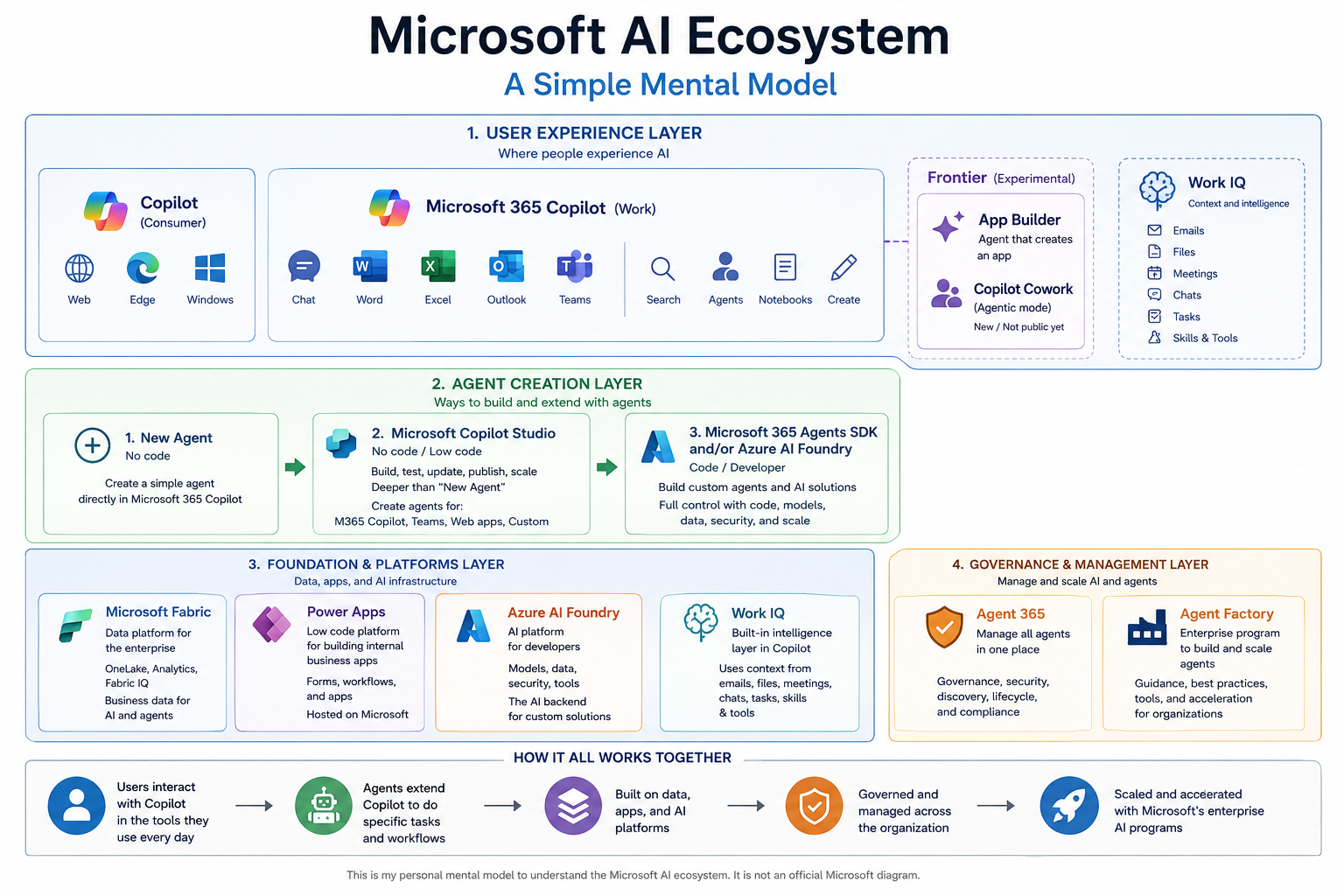
This is my simple mental model after researching the Microsoft AI offering.
1. Copilot: where users experience AI
Start here.
Copilot is the user-facing AI experience.
There are two main versions:
Copilot Consumer
This is the personal version of Copilot.
You use it through:
- web
- Edge
- Windows
- personal Microsoft account
Microsoft 365 Copilot
This is the work version.
It lives inside Microsoft 365 and connects to work tools like:
- chat
- Word
- Excel
- Outlook
- Teams
- files
- meetings
- emails
- tasks
My simple explanation:
Microsoft 365 Copilot is the AI interface for work.
It is where users chat, search, summarize, create, use agents, and work with company context.
2. Agents: how Microsoft lets you extend Copilot
Inside Microsoft 365 Copilot, you can create or use agents.
An agent is a focused AI assistant for a specific task.
The easiest way to understand agent creation is by complexity:
1. New Agent Simple, no-code, built inside Copilot2. Microsoft Copilot Studio More advanced no-code / low-code agent builder3. Microsoft 365 Agents SDK / Azure AI Foundry Code-based developer approach
That is the most useful ladder.
New Agent
This is the easiest option.
You click New Agent and create a basic agent without writing code.
Copilot Studio
This is deeper than New Agent.
It is still no-code / low-code, but gives more control. You can build, test, update, publish, and manage agents.
Agents can plug into:
- Microsoft 365 Copilot
- Teams
- websites
- custom apps
My simple explanation:
Copilot Studio is the serious no-code agent builder.
Microsoft 365 Agents SDK / Azure AI Foundry
This is the developer path.
Use this when you need code, custom logic, backend control, models, data connections, security, and more advanced AI systems.
My simple explanation:
Azure AI Foundry is the AI backend for developers.
3. Microsoft-built agents and Frontier features
Microsoft also has built-in or Microsoft-created agents.
Some are marked as Frontier, which basically means early, experimental, or beta-style features.
Example:
App Builder
App Builder is a Frontier agent that creates an app.
My simple explanation:
App Builder is an agent that helps create lightweight business apps.
It seems to combine ideas from:
- Copilot
- Copilot Studio
- Power Apps
You use it from Microsoft 365 Copilot, but the result feels like a lightweight Power Apps-style application.
4. Power Apps: internal business apps
Power Apps is Microsoft’s low-code tool for building internal business apps.
Examples:
- timesheet app
- IT support ticket app
- PTO request app
- inventory tracker
- approval workflow
My simple explanation:
Power Apps is for building internal business apps without traditional software development.
This is different from Copilot Studio.
Copilot Studio = build agentsPower Apps = build apps
But now AI is making these areas overlap.
That is part of the confusion.
5. Microsoft Fabric: business data
Microsoft Fabric is the data platform.
It is for storing, processing, analyzing, and connecting business data.
Related ideas:
- OneLake
- Power BI
- analytics
- Fabric IQ
- data agents
- business data for AI
My simple explanation:
Fabric is where business data can live so analytics and AI can use it.
Important note: Fabric does not magically contain all company data. It has to be enabled, set up, governed, and paid for.
6. Work IQ: work context
Work IQ is not really something I think of as a normal product.
It is more like Microsoft’s intelligence layer for work context.
It helps Copilot understand:
- emails
- files
- meetings
- chats
- tasks
- permissions
- tools
- organizational knowledge
My simple explanation:
Work IQ is the context layer behind Microsoft 365 Copilot.
I would not explain it as an app. I would explain it as the thing that helps Copilot understand work.
7. Agent 365: managing agents
Microsoft Agent 365 is for managing agents across an organization.
My simple explanation:
Agent 365 is the control plane for agents.
It is about:
- governance
- security
- discovery
- management
- compliance
- lifecycle
- shadow agents
You do not start here as a normal user. This becomes important when a company has many agents.
8. Agent Factory: enterprise agent program
Microsoft Agent Factory sounds like another product, but I think of it more as Microsoft’s enterprise program for scaling agents.
It connects many Microsoft AI pieces together:
- Microsoft 365 Copilot
- Copilot Studio
- Azure AI Foundry
- Fabric
- GitHub Copilot
- Azure AI Search
- governance tools
My simple explanation:
Agent Factory is Microsoft’s enterprise approach for helping companies build and scale agents.
It is not the same as Agent 365.
Agent 365 = govern agentsAgent Factory = scale agent adoption
Quick reference
Copilot= consumer AI assistantMicrosoft 365 Copilot= AI assistant for workNew Agent= easiest no-code way to create an agentCopilot Studio= advanced no-code / low-code agent builderMicrosoft 365 Agents SDK= developer SDK for custom agentsAzure AI Foundry= AI backend platform for developersPower Apps= low-code business app builderApp Builder= Copilot agent that creates lightweight appsMicrosoft Fabric= business data and analytics platformWork IQ= work context layer behind CopilotAgent 365= governance and management for agentsAgent Factory= enterprise program for scaling agent adoption
The shortest version
If you are new to Microsoft AI, think of it like this:
Use AI:Microsoft 365 CopilotCreate a simple agent:New AgentCreate a serious no-code agent:Copilot StudioBuild custom AI with code:Azure AI Foundry / Agents SDKBuild internal apps:Power Apps / App BuilderUse business data:Microsoft FabricManage agents:Agent 365Scale agents across the company:Agent Factory
This is the mental model that helped me understand the clutter.
Microsoft’s documentation explains the pieces, but not always the map. This is my map.